Monday, May 20, 2019

HTTP to HTTPs Redirect Loop

We are implementing the WordPress site where I am trying to redirect the site from HTTP to HTTPs. Everything is set but still site is not able to redirect to HTTPs then below setting in Wordpress helped me to redirect.

Edit wp-config.php

if
(($_SERVER['HTTP_CLOUDFRONT_FORWARDED_PROTO'] ==
'https') OR ($_SERVER['HTTP_X_FORWARDED_PROTO'] ==
'https'))
{$_SERVER['HTTPS']='on';}

Wednesday, June 11, 2014

Checking Passwordless Login Enabled or Not

If you want to check if passwordless login enabled or not on the given host then below is the command which can be used to check for the same.

ssh -o StrictHostKeyChecking=no -o NumberOfPasswordPrompts=0 host0103 "echo hello"

We can run this in for loop for the number of hosts and it will either print error if password less login is not allowed or print the word "hello" if it is enabled. 

Friday, March 21, 2014

Extract and Repack Debian Package

I just needed to repack a Debian package to solve this problem below are the steps. 
$ mkdir -p extract/DEBIAN
$ dpkg-deb -x package.deb extract/
$ dpkg-deb -e package.deb extract/DEBIAN
[...do something, e.g. edit the control file...]
$ mkdir build
$ dpkg-deb -b extract/ build/
  • -x extracts the package contents
  • -e extracts the control files
  • -b builds the new package
Done.

Monday, December 30, 2013

Recover Deleted File


grep -a -B 25 -A 100 'some string in file' /dev/sda1 > results.txt


grep searches through a file and prints out all the lines that match some pattern. Here, the pattern is some string that is known to be in the deleted file. The more specific this string can be, the better. The file being searched by grep (/dev/sda1) is the partition of the hard drive the deleted file used to reside in. The -a flag tells grep to treat the hard drive partition, which is actually a binary file, as text. Since recovering the entire file would be nice instead of just the lines that are already known, context control is used. The flags -B 25 -A 100 tell grep to print out 25 lines before a match and 100 lines after a match. Be conservative with estimates on these numbers to ensure the entire file is included (when in doubt, guess bigger numbers). Excess data is easy to trim out of results, but if you find yourself with a truncated or incomplete file, you need to do this all over again. Finally, the > results.txt instructs the computer to store the output of grep in a file called results.txt. [Ref]

Thursday, October 17, 2013

Convert Dmesg timestamp to Human readable format.

I am using ubuntu 12.04 where util-linux package is update and you have the option of converting dmesg timestamp to human readable format just by passing option "-T". But for those who are using the dmesg which doesn't support "-T" option can use below simple program to convert it into human readable format.

Program_file: dmesg_realtime.sh
Parameters: dmesg_timestamp

#cat dmesg_realtime.sh
#!/bin/bash
ut=`cut -d' ' -f1 < /proc/uptime`
ts=`date +%s`
realtime_date=`date -d"70-1-1 + $ts sec - $ut sec + $1 sec" +"%F %T"`
echo $realtime_date

#./dmesg_realtime.sh 8642755.690405
2013-08-16 08:48:09


Tuesday, September 24, 2013

Top 10 MySQL Mistakes Made By PHP Developers

I just came across the Blog written by "Craig Buckler" Director of OptimalWorks which will be useful for the PHP Developers.

Monday, August 12, 2013

Postfix as a spam trap server

Reference here

If you want to build a Spam trap with Postfix this can be done very very easy. You don't even have to configure Postfix to act as a Spam trap.
Postfix ships with a neat tool called smtp-sink which does the trick.
smtp-sink is mainly intended to act as a testing tool for SMTP clients which need a Server to play with. So you can configure it to log the whole conversation or even dump each received mail to a file. The latter is needed for a spamtrap.

There is no configuration file to configure smtp-sink. Everything is done via command-line options.
smtp-sink -c -d "%Y%m%d%H/%M." -f . -u postfix -R /tmp/ -B "550 5.3.0 The recipient does not like your mail. Don't try again." -h spamtrap.example.com 25 1024
Let's have a closer look to each parameter.
  • -u postfix
    Runs the program under the user "postfix"
  • -R /tmp/
    Sets the output directory to /tmp/. In this directory the mails will be stored. If you have a high spam volume (hundreds of Spam per minute) it is recommended to write the mails to a ramdisk
  • -d "%Y%m%d%H/%M."
    Writes the mail to a directory of the format "YearMonthDayHour" and in this directory the files are name "Month.RandomID". Note that the dates are in UTC
  • -c
    Write statistics about connection counts and message counts to stdout while running
  • -f .
    Reject the mail after END-OF-DATA. But the mail will be saved. Cool, isn't it?!
  • -B "550 5.3.0 The recipient does not like your mail. Don't try again"
    This is the rejection message after END-OF-DATA.
  • -h spamtrap.example.com
    Announce the hostname spamtrap.example.com
  • 25
    The port to listen on. Can be prepended with an IP or host if you want to bind on a special interface.
  • 1024
    The backlog count of connections that can wait in the TCP/IP stack before they get a free slot for sending mail.
You can find more information in the man page of smtp-sink, but these are the important ones to run a catch-all spamtrap.
In this configuration the program accepts any mail with any size from any sender to any recipient with IPv4 and IPv6. The only restrictions are that there are only 256 simultaneous connections possible with 1024 queued connections and the program is flagged experimental.
So do not use smtp-sink in a production environment.

The next step of a Spamtrap is to read the saved files, parse and interpret them and then do whatever is needed. For example block further connections from that IP via a firewall, feed it to a blacklist, scan for viruses or create checksums from these mails.

The -B option is only valid in newer versions of Postfix. In 2.7.1 it is missing. In 2.8.2 it is present. Somewhere in-between it was introduced. 

Thursday, July 25, 2013

MySQL Scaling technique.

Global Configuraiton Level:

  1. thread_cache_size
    Change if you do a lot of new connections.
  2. table_cache
    Change if you have many tables or simultaneous connections
  3. delay_key_write
    Set if you need to buffer all key writes
  4. max_heap_table_size
    Used with GROUP BY
  5. sort_buffer
    Used with ORDER BY and GROUP BY
  6. query_cache_type
    Set this ON if you are repeating the sql queries default OFF
  7. query_cache_size
    Set this to any perticuler value >= query_cache_limit. To disabled query_cache_size set the value to "0".
MyISAM

  1. key_buffer_size
    Change if you have enough RAM to store available MyISAM table Index
  2. myisam_sort_buffer_size
    Useful when Repairing tables.
  3. myisam_use_mmap
    Use memory mapping for reading and writing MyISAM tables.

InnoDB

  1. innodb_buffer_pool_size
    Change if you have enough RAM to store available InnoDB table Index.
  2. innodb_support_xa
    Turn off if you don't need it for safe binary logging or replication
  3. innodb_doublewrite
    If enable then 5-10% performance loss due to use of doublewrite
  4. innodb_lock_wait_timeout
    To remove the deadlock process after certain timeout value.
  5. innodb_thread_concurrency
    A recommended value is 2 times the number of CPUs plus the number of disks.
  6. innodb_flush_method
    On some systems where InnoDB data and log files are located on a SAN, it has been found that setting innodb_flush_method to O_DIRECT can degrade performance of simple SELECT statements by a factor of three.
  7. innodb_flush_log_at_trx_commit
    For the greatest possible durability and consistency in a replication setup using InnoDB with transactions, you should use innodb_flush_log_at_trx_commit=1, sync_binlog=1
  8. innodb_file_per_table
    This will create the file per table same as MyISAM

System Level:

1. Disable DNS Hostname Lookup
3. RAID 10 is must for high I/O performance.
4. ResierFS is recomended filesystem by most of the blog posts but xfs is doing good for us over RAID 10.

Architectural Level:

1. Use VARCHAR datatype instead of CHAR.
2. AUTO_INCREMENT should be BIGINT if there are Million Row insert/delete.

Thursday, January 19, 2012

Script to execute given command on multiple remote hosts


Script is use to execute any command on multiple remote hosts.


#runcmd --help
Usage: runcmd -u "username" -d "domain" -s "servers1,server2" -c "command"

Options:
  -h, --help            show this help message and exit
  -s SERVER, --server=SERVER
                        servers to update
  -u USER, --user=USER  user name
  -d DOMAIN, --domain=DOMAIN
                        domain name
  -c COMMAND, --command=COMMAND
                        remote command to execute
  -v, --verbose         verbose


Copy paste following in "runcmd" and make sure that file is in executable mode.

#!/usr/bin/python
#Auther: Prasad Wani
#This script will execute the given command on any remote server
#


import commands
from optparse import OptionParser
import pexpect
import os
import getpass
import paramiko
import ConfigParser
import sys


usage = 'usage: %prog -u "username" -d "domain" -s "servers1,server2" -c "command"'
parser = OptionParser(usage)
parser.add_option('-s', '--server', dest='server', help='servers to update')
parser.add_option('-u', '--user', dest='user', default='prasad', help='user name')
parser.add_option('-d', '--domain', dest='domain', default='sjc2', help='domain name')
parser.add_option('-c', '--command', dest='command', help='remote command to execute')
parser.add_option('-v', '--verbose', dest='verbose', action='store_true', help='verbose')


options, args = parser.parse_args()
if not len(sys.argv) > 1:
  parser.error("Some required options are missing, please run 'runcmd --help'")


hosts = options.server
hosts = hosts.split(',')


username = options.user
password = getpass.getpass(prompt="\033[34m"'Please enter the password for user'+' '+username+':'"\033[0m")


def verify_password (host, username):
   global password
   try:
    ssh = paramiko.SSHClient()
    ssh.load_system_host_keys()
    ssh.set_missing_host_key_policy(paramiko.AutoAddPolicy())
    ssh.connect(host, 22, username, password)
    ssh.close()
   except paramiko.AuthenticationException:
    print "\033[31m""Error: Authentication Failed""\033[34m"
    password    =   getpass.getpass(prompt="\033[34m"'Please enter the password for user'+' '+username+':'"\033[0m")
    verify_password(host, username)


for host in hosts:
            host = host.strip()+"."+options.domain+".com"
   print host
   ssh = paramiko.SSHClient()
            ssh.set_missing_host_key_policy(paramiko.AutoAddPolicy())
            ssh.connect(host, 22, username, password)
   print options.command
            stdin, stdout, stderr = ssh.exec_command(options.command)
            print "------------"
            print stdout.read()
            ssh.close()

Monday, July 4, 2011

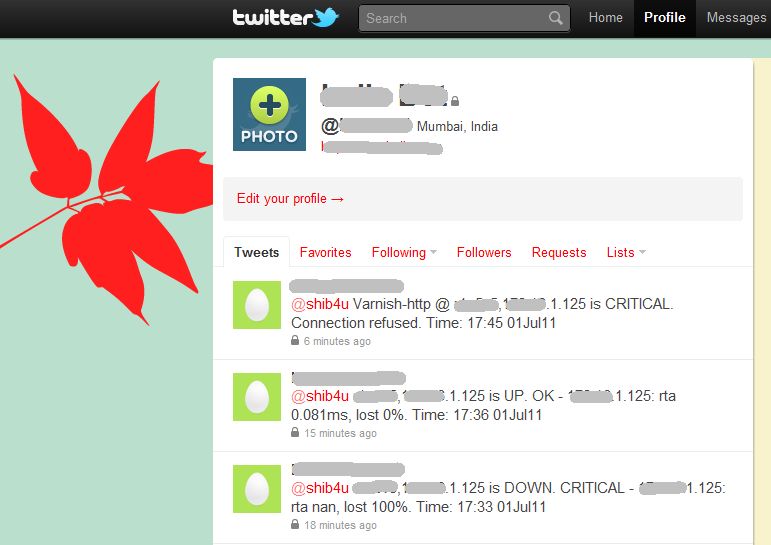
Opsview (and Nagios) with Twitter

I have written a post about integrating Twitter posts in Opsview here. With a few modifications, this can be adapted in Nagios also. The Opsview (or Nagios) notifications will be posted on a Twitter account. Interested (or uninterested) users (read "system admins") can subscribe to this account and keep themselves posted.

With iPhone and Android powered phones, keeping a check of your twitter account is super easy !

Wednesday, June 22, 2011

Selecting BINLOG_FORMAT in MySQL

There are several reasons why a client might want to set binary logging on a per-session basis:
  • A session that makes many small changes to the database might want to use row-based logging.
  • A session that performs updates that match many rows in the WHERE clause might want to use statement-based logging because it will be more efficient to log a few statements than many rows.
  • Some statements require a lot of execution time on the master, but result in just a few rows being modified. It might therefore be beneficial to replicate them using row-based logging.
So it seems that ROW base logging will help on the queries which has more update having where clause and taking time on master. Because in "STATEMENT" log format statement is exactly copied as it is and stored in log and same statement is replicated on slave. but if "ROW" base logging enabled then only updated ROWS are stored in the logs and only those ROW's statements only executed on SLAVE. 
[Ref]

Saturday, March 12, 2011

Fixing a Corrupt MySQL Relay Log


When there are network problems between the server, there was some issue where the master didn’t properly detect and notify the slave of the failure. This resulted in parts of queries missing, duplicated, or replaced by random bits in the relay log on the slave. When the slave tries to execute the corrupt query, it will likely generate an error that begins with:
Error You have an error in your SQL syntax; check the manual that corresponds to
your MySQL server version for the right syntax to use near . .
A work-around which forces the slave to re-request the binary log from the master. Run ‘SHOW SLAVE STATUS’ and make note of the Master_Log_File and Exec_Master_Log_Pos columns. Then run ‘STOP SLAVE’ to suspend replication, and run this SQL:
CHANGE MASTER TO master_log_file='',
master_log_pos=;
After that, simply run ‘START SLAVE’ to have replication pick up from there again. That evidently has the slave re-request the rest of the master’s binary log, which it should (hopefully) get without becoming corrupt, and replication will continue as normal.

[Ref]

Thursday, September 23, 2010

How to listdown directories

ls -d */

the -d says “do not descend into sub-directories, it is the same as saying -d1.
The */ says list only items ending in / (which are directories).
If you want to see hidden directories, you could do a ls -d .*/

Friday, July 16, 2010

Creating ISO image of Installed OS

When you want to create the ISO image of Installed OS use the following command.

mkisofs -force-rr -m /proc -m /sys -o file.iso / [proc and sys are excluded intentionally]


To test this use the following

mount -o loop file.iso /mnt

Friday, July 9, 2010

log-slave-updates

Normally, a slave does not log to its own binary log any updates that are received from a master server. This option tells the slave to log the updates performed by its SQL thread to its own binary log. For this option to have any effect, the slave must also be started with the --log-bin option to enable binary logging. --log-slave-updates is used when you want to chain replication servers.

For example, you might want to set up replication servers using this arrangement:

A -> B -> C
Here, A serves as the master for the slave B, and B serves as the master for the slave C. For this to work, B must be both a master and a slave. You must start both A and B with --log-bin to enable binary logging, and B with the --log-slave-updates option so that updates received from A are logged by B to its binary log.

[ref: http://dev.mysql.com/doc/refman/5.1/en/replication-options-slave.html]

Monday, June 7, 2010

How to get an absolute value

Some times when we calculating difference we don't want to show the negative value. What we are interested in is only the difference. so here is the command.


prasad@mac:~# absolute_value=-123
prasad@mac:~# echo ${absolute_value#-}
123

You can use this in any shell script.

Tuesday, May 11, 2010

On the Fly zip unzip mysql Backup

mysqldump -u root -ppassword RECEIPTS BlockedNumbersTable | bzip2 -9 | ssh host0119 "bzip2 -d > /mnt/data1/prasad.sql"

Tuesday, March 9, 2010

Vim Syntax

Some times it is observe that vim syntax is not working by default when you install the vim. To git rid of this create the ~/.vimrc file in your home directory with following context

syntax on

thats it. you are done. next time it will automatically support syntax and follow the appropriate coloring information while you do scripting in vim.

Monday, December 14, 2009

Extract Last Field

You can use 'cut' to extract the last field of a line if you know how many fields there are, eg:
field=`cut -d: -f8 file`

But if you don't know the maximum number of fields or the number of fields per line are not consistent, awk can come to the rescue. awk has the inbuilt variable NF for the number of fields. By using this variable we can use it to extract the last field by using:

field=`awk -F: '{print $NF}'`

or you can use calculations to retrieve any field relative to the last field. For example to retrieve the second last field, use:

field=`awk -F: '{print $(NF-1)}'`

Thursday, October 29, 2009

Making current directory available on HTTP

python -m SimpleHTTPServer

Serve current directory tree at http://$HOSTNAME:8000/